
By J.L. Brent
In today’s competitive business environment, companies of all sizes must embrace a culture of learning to stay ahead. One effective way to support this effort is by creating an internal learning hub, a centralized location where employees can access resources, training, and information independently. SharePoint, a collaboration platform developed by Microsoft, is a powerful tool for creating such hubs, offering scalability and customization options suitable for both small businesses and large enterprises.
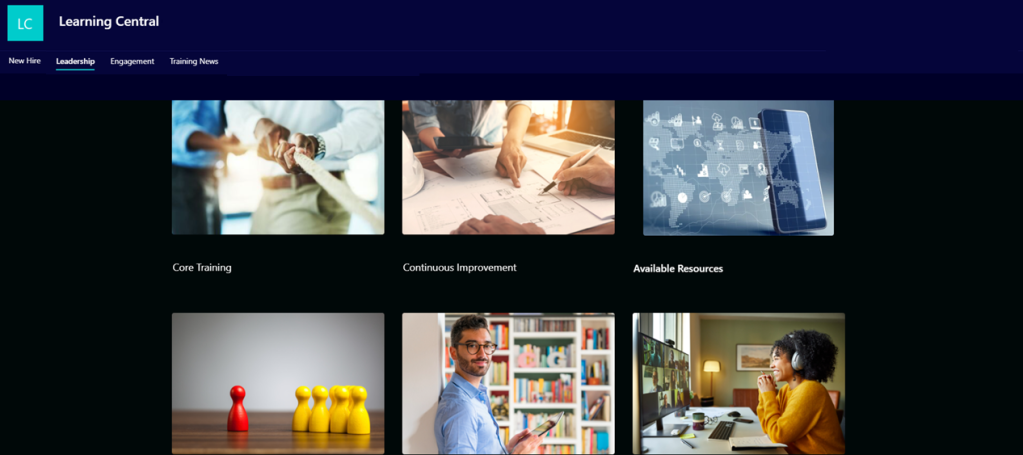
This article examines how SharePoint makes creating an internal learning hub straightforward, highlights the value of self-directed learning, and explores how even organizations with global learning platforms can use SharePoint to enhance engagement through department-specific hubs.
Why SharePoint Is Ideal for Internal Learning Hubs
SharePoint provides an intuitive platform for building internal learning hubs without requiring extensive IT expertise. Its flexibility makes it a strong choice for organizations of all sizes and structures, from startups to multinational corporations.
Key Features of SharePoint Learning Hubs
- Centralized Resource Library: A single location to store training manuals, video tutorials, compliance documents, and interactive e-learning modules.
- Customizable Layouts: Templates and branding options allow for tailored designs.
- Permission Controls: Administrators can control access to ensure that the right content is available to the right users.
- Integration With Tools: SharePoint integrates seamlessly with Microsoft Teams, Viva Learning, and other Microsoft 365 apps.
- Scalability: Effective for small teams, specialized departments, or global organizations with diverse training needs.
The Value of Department-Specific Learning Hubs
Even large companies with comprehensive global learning platforms can benefit from department-specific SharePoint hubs. Global platforms often provide a wealth of resources but can overwhelm employees who need specialized content quickly. Department-specific hubs reduce this complexity by curating targeted materials, lowering barriers to engagement.
Benefits of Department-Specific Hubs
- Tailored Content: Resources are specific to departmental needs, such as job-specific skills, certifications, and tools.
- Curated Knowledge Boards: Employees can easily locate updated and relevant materials without sifting through unrelated content.
- Lower Barriers to Engagement: Streamlined access ensures employees remain motivated to explore and use learning resources.
For example, a manufacturing company might use its global learning platform for broad compliance training while maintaining a SharePoint hub for its logistics department to house tutorials on supply chain software and processes.
Examples of Companies Embracing Learning Hubs
Google: Google’s internal learning platform, “gLearning,” exemplifies how a company can foster innovation through accessible resources. While the platform offers company-wide resources, smaller teams also curate their own materials for project-specific training, demonstrating the importance of targeted learning.
Microsoft: Microsoft’s Learning and Development Center, powered by SharePoint, serves as a prime example of scalability. The platform provides employees with access to global training resources while also supporting specialized hubs for departments, offering a personalized learning experience.
Case Study: General Electric’s Brilliant U
General Electric (GE) transformed its corporate learning culture with a SharePoint-based platform called Brilliant U. According to a report published in Training Industry Magazine, Brilliant U was developed to modernize workforce skills and improve employee engagement globally.
GE’s Approach
- Open Access: The platform provided employees at all levels with easy access to training, encouraging transparency and self-direction.
- Localized Resources: Departments were empowered to upload content specific to their workflows and technical requirements.
- Engagement Strategies: Gamification, such as point systems and leaderboards, drove participation. Leadership contributed content, further integrating learning into company culture.
The Results
Brilliant U significantly increased employee engagement with learning programs, reduced turnover rates, and boosted productivity. The platform’s department-specific content made it easier for employees to find the resources they needed, contributing to GE’s overall success in reshaping its corporate learning environment.
Getting Started
Setting up a SharePoint learning hub is easier than many organizations might assume. Here are five steps to launch a successful hub:
- Define Objectives: Establish clear goals, such as enhancing onboarding, improving compliance, or fostering career development.
- Curate Resources: Gather high-quality materials, ensuring content is relevant and up to date.
- Customize the Hub: Use SharePoint’s templates to create a user-friendly layout that reflects your organization’s branding.
- Engage Stakeholders: Collaborate with department heads and employees to tailor the hub to meet specific needs.
- Promote the Hub: Use email campaigns, workshops, and leadership endorsements to drive awareness and encourage usage.
A Powerful Tool for Companies of All Sizes
SharePoint offers a practical and scalable solution for organizations looking to build internal learning hubs. Whether supplementing a global platform or creating a standalone resource, SharePoint’s customizable and intuitive features make it ideal for businesses ranging from small startups to large corporations.
As demonstrated by companies like Google, Microsoft, and General Electric, SharePoint learning hubs are a valuable tool for fostering a culture of learning. By providing tailored and accessible resources, organizations can empower employees, improve engagement, and ensure long-term success.
Investing in a SharePoint learning hub is not just about training, it’s about enabling your workforce to grow and adapt in a rapidly changing world.

 Brent Folio